

Today, we're going to look at generating music locally on your computer. We'll be using a tool on a Mac, since Apple machines have processors that provide the necessary computing power to run a local music model.
For quite some time now, I've been very interested in artificial intelligence models, how they work, and especially how to create one.
One day perhaps we will see how to create a new one, and what it needs to know/tools, but that's not for tomorrow.
As a side note, I stumbled upon Suno a while back, and I already found the result amazing, although the generated voice sounds similar to many other tracks composed by other people. But I think that's just a coincidence.
For your information: the machine I use is a 2026 Macbook Air. It's not the most powerful model in the Macbook range, but it has the merit of holding its own in terms of performance.
In the case of Macbook Air, they have small fans that cool sufficiently for heavy use of the laptop, but not for a model that can take several hours to respond.
Furthermore, the heat is transferred to the computer casing, and can make the machine burning hot.
Okay, now that the disclaimer is out of the way, we can get to the heart of the matter.
The application used
To generate music on your Mac, we'll use the open-source software YuE Studio, available on GitHub here: https://github.com/tonywestonuk/YuE-Studio
This program is designed specifically to run on Apple Silicon chips (M3, M4 series, etc.), and not on Intel processors. It also uses the computer's integrated graphics card to generate tracks. A key feature of the application: if you own an iPhone, you can also use it as a resource to generate tracks more quickly.
Thus, the interface looks like this:
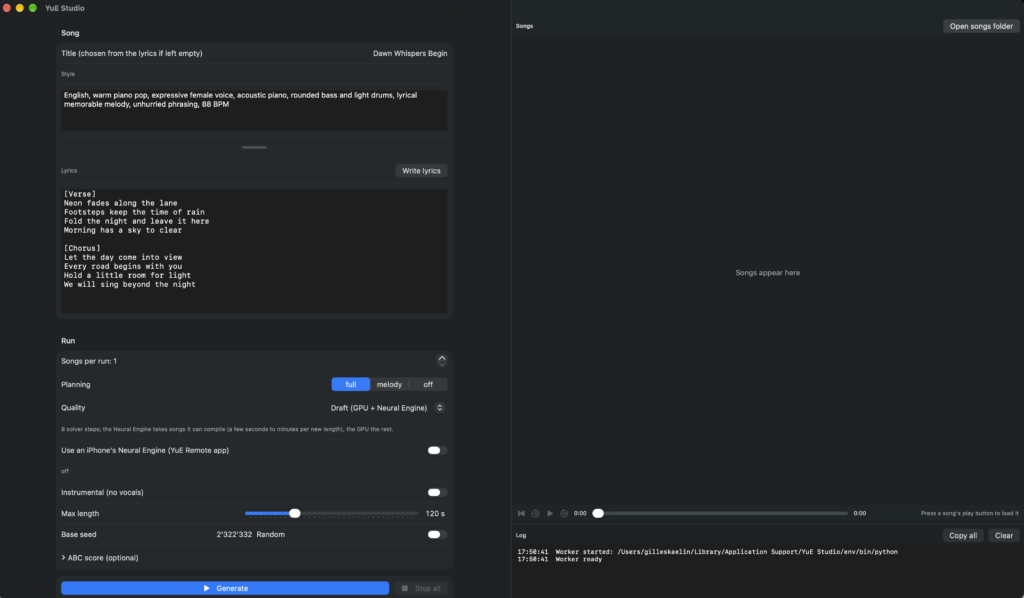
Thus, the application is structured as follows.
Section Song
Here we specify the parameters for the song itself. We can specify the song title (which will be used for the project title), as well as the song style. This is where we specify the rhythm, for example, how it's played, or whether it's in a country or rock style.
Just below, in the lyrics section, we can write the lyrics to our song, if we have any. It's perfectly possible to create an instrumental track, and that might be how our song will stand out from the others.
Section Run
This section allows you to define parameters related to the generation of your song. Specifically, you can define the following parameters:
- The number of pieces to generate per execution
- Should the lyrics be generated, or just the melody?
- Whether you need to generate a draft version (faster, but lower quality), or the final high-quality render, you need to know the requirements.
- Determine if an iPhone will be used to assist in generation
- The maximum duration of the track (between 30 seconds and 6 minutes)
- The seed base for generation
- The ABC score (the music score in text format) (optional, but useful if you have a fairly precise idea of your piece)
You can go quite far in the generation parameters; it's then up to you to define what you want.
Right panel: Song list
The right-hand panel contains all ongoing projects as well as working documents for your various songs.
This is where you can listen to them, edit them, and also request a high-quality rendering (if you are working with drafts).
And that's all for the creation
The best way to master a tool is to use it and get to grips with it. Feel free to send me your creations via Twitter 🙂